Why Event Management Software is Essential for Modern Event Planning
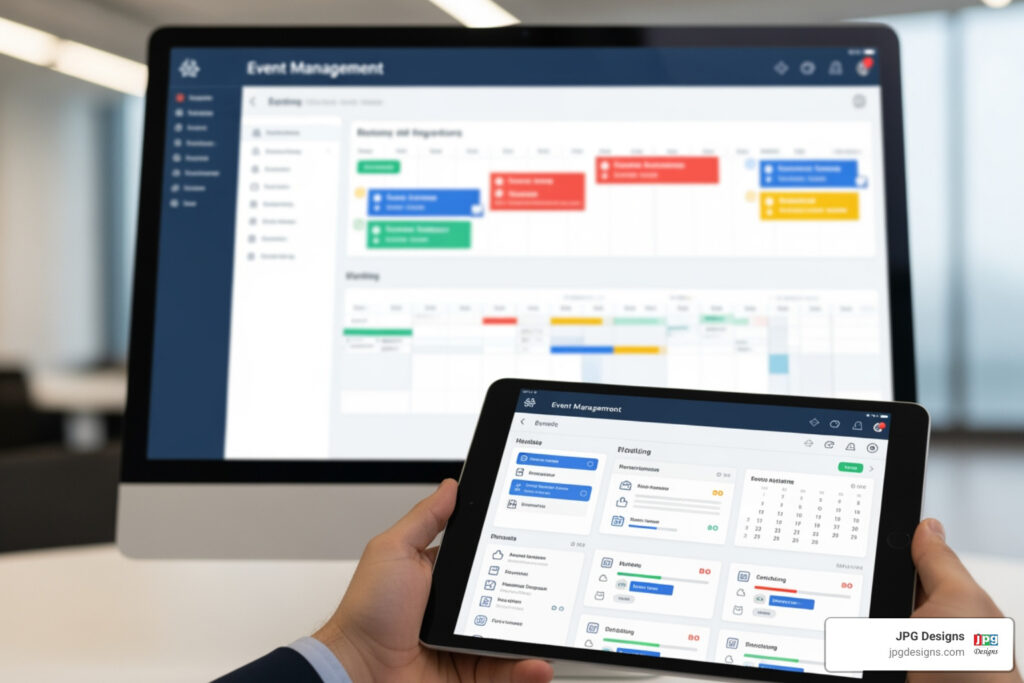
Event management software transforms how organizations plan, execute, and measure their events. These all-in-one platforms replace scattered spreadsheets, endless email chains, and last-minute scrambles with a centralized system that handles everything from registration to post-event reporting.
Here’s what event management software does:
- Simplifies Registration & Ticketing: Create custom forms, sell tickets, and process payments in one place
- Automates Marketing: Send branded invitations, reminders, and updates automatically
- Boosts Engagement: Provide mobile apps, live polling, Q&A, and networking tools for attendees
- Streamlines Check-in: Speed up on-site entry with QR codes and instant badge printing
- Tracks Performance: Monitor attendance, engagement, and ROI with real-time analytics
- Supports Any Format: Manage in-person, virtual, or hybrid events from a single platform
The shift to event management software isn’t just a trend—it’s become essential for success. Over 85% of event planners already rely on these tools, and the market is booming with a projected compound annual growth rate of 11.8%.
If you’ve ever juggled multiple spreadsheets while trying to track RSVPs, or panicked when your email list didn’t sync with your ticketing system, you understand the pain. One event planner shared that using an event management platform cut their labor by over 200 hours. That’s five full work weeks returned just by choosing the right tool.
This guide breaks down what event management software is, how to choose the right platform for your specific needs, and what solutions can help you plan seamless, memorable events—whether you’re organizing a small fundraiser or a major industry conference.
I’m Jeff Pratt, and I’ve spent over 15 years helping organizations build digital systems that drive real results, including nonprofits and event-focused businesses that rely on event management software to streamline their operations. At JPG Designs, we understand that your event’s success starts with the right technology and a strong digital presence.
Key terms for event management software:
What is Event Management Software? Core Functions and Must-Have Features
One of the biggest pain points for event organizers is the sheer volume of disparate tools and information they have to manage. From guest lists in spreadsheets to email campaigns in one system and ticketing in another, it’s easy for things to get messy. Event management software solves this by providing a single source of truth, centralizing all event-related tasks and data.
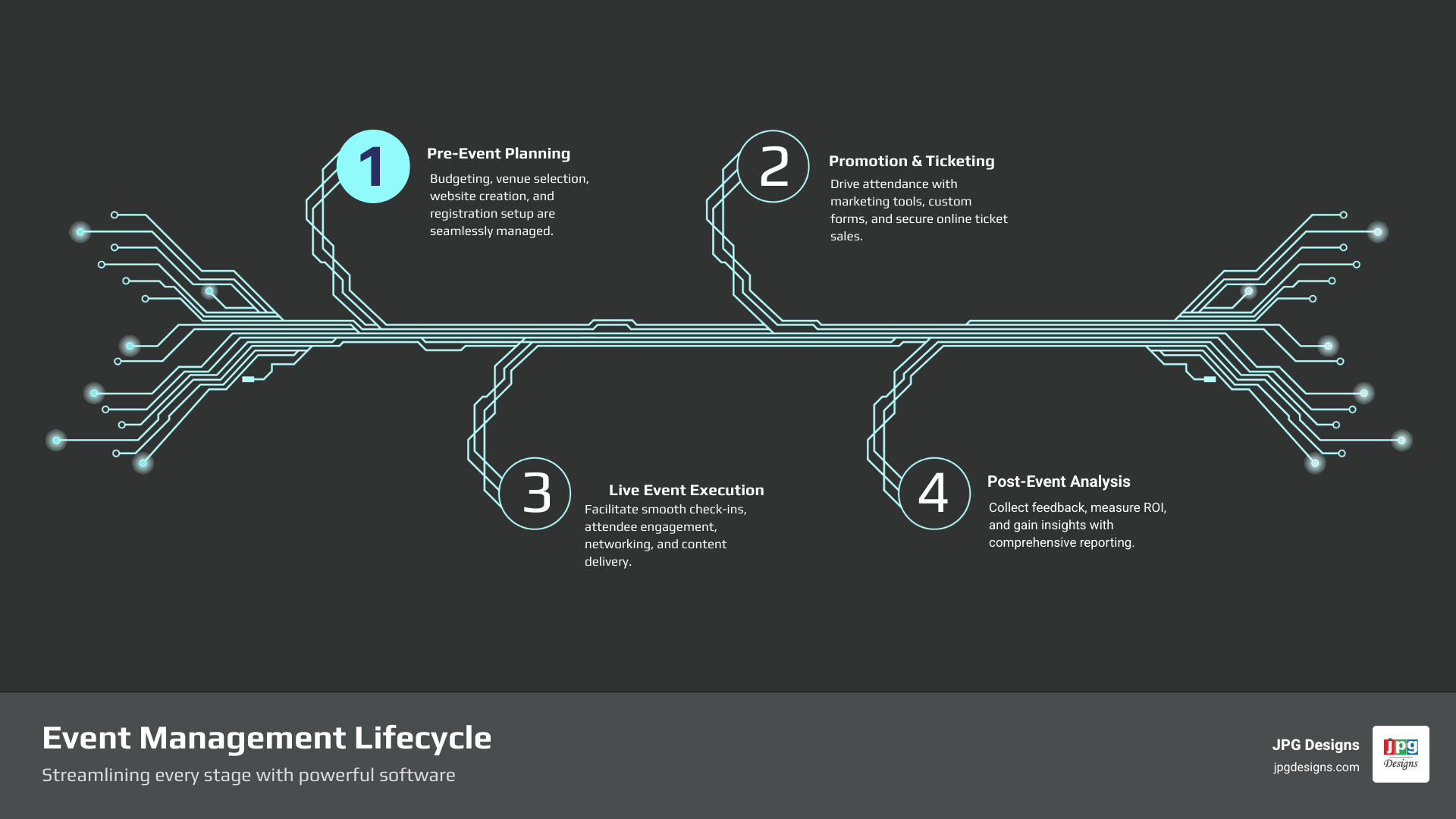
At its core, event management software is a comprehensive digital platform designed to streamline the entire event lifecycle. It acts as your command center, allowing you to manage every aspect of an event from initial concept to post-event analysis.
Core Functions of Event Management Software:
- Event Creation: From setting up event details, dates, and venues to designing branded event websites.
- Registration & Ticketing: Building custom registration forms, managing guest lists, selling tickets, and processing payments securely.
- Marketing & Promotion: Spreading the word about your event through integrated email campaigns, social media tools, and promotional features.
- Attendee Engagement: Keeping attendees informed, connected, and entertained before, during, and after the event through mobile apps, networking tools, and interactive sessions.
- Reporting & Analytics: Tracking key metrics, gathering feedback, and analyzing event performance to measure success and inform future planning.
To truly transform your event planning, your chosen event management software should come equipped with a robust set of features. These aren’t just nice-to-haves; they are essential tools that empower you to deliver seamless experiences and maximize your event’s impact.
Must-Have Features in Event Management Software:
- Customizable Event Website & Registration Pages: The ability to design a professional, on-brand event website and registration forms that reflect your organization’s identity and capture all necessary attendee information. Platforms like EventCreate allow you to build beautiful event websites in minutes, while others like Swoogo are praised for their customizable websites and registration forms.
- Secure Online Ticketing & Payment Processing: Essential for collecting revenue and managing attendee access. This includes flexible ticket types, add-on purchases, and secure payment gateways. RSVPify, for instance, is known for its unique online ticketing features.
- Email Marketing & Communication Automation: To keep attendees informed and engaged. This includes sending invitations, confirmations, reminders, and post-event follow-ups. Tools like MailChimp and Buffer can often integrate with your event management software for comprehensive marketing.
- Agenda & Session Management: For organizing multi-track events, speaker schedules, and allowing attendees to build personalized itineraries. Whova and EventsAir are excellent for managing complex agendas.
- Mobile Event App: A dedicated app for attendees to access schedules, speaker bios, maps, network with others, and receive real-time updates. This is crucial for enhancing the on-site experience.
- Attendee Networking Tools: Features like attendee profiles, direct messaging, and meeting schedulers within the platform or mobile app to foster connections. Whova, for example, excels in attendee networking and engagement.
- On-site Check-in & Badging: To ensure a smooth and efficient entry process. QR-based check-in and instant badge printing can significantly reduce queues and stress. RSVPify offers an Event Check-In Suite for any event.
- Live Polling, Q&A, and Surveys: Interactive tools to boost engagement during sessions and gather valuable feedback. Slido and Poll Everywhere are popular for crowdsourcing questions and increasing participation.
- Data Analytics & ROI Reporting: Comprehensive dashboards and customizable reports to track registrations, attendance, engagement metrics, and financial performance, helping you understand your event’s return on investment.
By consolidating these functions and features into a single event management software, we can move away from manual tasks that consume valuable time and energy. This allows us to focus on what truly matters: creating a memorable and impactful experience for our attendees.
How to Choose the Right Platform for Your Needs
Choosing the right event management platform can feel like navigating a maze. With so many options available, it’s easy to fall into analysis paralysis. The key is to assess your specific event needs and organizational goals to find a tool that genuinely fits, rather than trying to fit your needs to a tool.
Here are the critical considerations we guide our clients through when selecting an event management software:
- User-Friendliness: An intuitive design is paramount. We’ve seen how a clunky interface can deter even the most tech-savvy users. Look for platforms that boast a low learning curve for both organizers and attendees. Reviewers often praise platforms like Webex Events & Webinars and Swoogo for their ease of use, noting that minimal onboarding is required. Third-party review sites like G2 are invaluable for unbiased testimonials on user-friendliness.
- Integrations: Your event management software shouldn’t exist in a vacuum. It needs to seamlessly connect with your existing CRM, email marketing platforms, and other business tools. This ensures smooth data flow, avoiding manual data entry and enabling a holistic view of your audience. For instance, platforms like EventsAir and Cvent offer robust API and CRM integrations, allowing you to connect with tools like Salesforce and HubSpot.
- Event Format Support: The landscape of events has evolved. Whether you’re planning an in-person gathering, a fully virtual conference, or a dynamic hybrid experience, your software needs to support these formats effectively. Look for features custom to each: live streaming capabilities for virtual, efficient check-in for in-person, and unified attendee experiences for hybrid events. EventsMobi and EventsAir are designed to offer solutions across all three formats.
- Pricing Models: This is where things can vary significantly. Some platforms charge per event, others per user, and many have per-registration fees. Some, like RSVPify, offer a free tier if you’re selling tickets (with transaction fees) or paid plans starting at a monthly rate. Nonprofits might find platforms like Qgiv and Zeffy appealing, as they offer free plans with certain limitations. Always scrutinize the pricing structure to ensure it aligns with your budget and anticipated event volume, paying close attention to any hidden transaction fees.
- Customer Support: When an issue arises mid-event, you need responsive, high-quality support. We always emphasize the value of vendors who offer dedicated support teams, online resources, and quick response times. Platforms like EventsAir pride themselves on 24/7 customer service and technical support.
- Security: Data privacy and secure payment processing are non-negotiable. With increasing concerns around data breaches, ensure your chosen platform adheres to strict security protocols and compliance standards (like GDPR). RSVPify, for example, highlights its industry-leading commitment to data security and privacy, emphasizing they do not sell user or guest data.
- Reviews: Beyond vendor websites, always consult independent review platforms. Using sites like G2 allows you to read real-world experiences, understand common pain points, and get an unbiased perspective on a platform’s strengths and weaknesses.
By carefully evaluating these factors, you can move beyond the marketing hype and select an event management software that genuinely empowers your team and lifts your events.
A Comparison of Top Event Management Software Solutions

The market for event management software is vast and varied, offering solutions for every type of organization and event. Understanding this crowded landscape is crucial to finding the right tool that addresses your specific pain points and helps you achieve your event goals. We typically categorize these solutions into a few main types to help our clients steer their options.
| Feature / Software Type | All-in-One Enterprise Platforms | User-Friendly Platforms (SMBs/Nonprofits) | Specialized Software |
|---|---|---|---|
| Primary Use Case | Large conferences, trade shows, complex corporate events | Small to medium events, recurring events, fundraising | Specific needs (virtual events, ticketing, auctions) |
| Key Features | End-to-end management, advanced analytics, venue sourcing | Easy setup, strong engagement, marketing tools, reporting | Deep functionality in one area (e.g., immersive virtual booths, mobile bidding) |
| Cost | Higher, often custom pricing | Moderate, subscription-based, some free tiers | Varies, can be per-event or subscription for niche features |
| Learning Curve | Moderate to steep | Low to moderate | Varies by specialization |
| Integrations | Robust CRM & marketing automation integrations | Standard CRM & email marketing integrations | Often requires integration for a complete solution |
| Scalability | Highly scalable for thousands of attendees | Good for growing events, but may have limits | Excellent for its niche, but not comprehensive |
All-in-One Enterprise Platforms
These robust solutions are designed for organizations managing large-scale, complex events that require extensive functionality and deep customization.
- Best for: Large-scale conferences, trade shows, multi-day summits, and complex corporate events. They handle intricate logistics for thousands of attendees.
- Features: They offer end-to-end management, often including advanced features like venue sourcing, detailed attendee tracking, sophisticated analytics, and multi-track session management. Platforms like Cvent are built for this depth and scale, bringing everything into one place for enterprise-level event marketing and management. EventsAir is another powerful all-in-one solution, boasting over 350,000+ events powered worldwide, offering end-to-end planning for any event, big or small.
- Considerations: These platforms typically come with a higher cost and may have a steeper learning curve due to their comprehensive feature sets. However, for organizations with complex needs, the investment often pays off in efficiency and insights.
- Use Case: Imagine managing a multi-track international conference with thousands of attendees, requiring complex registration flows, concurrent sessions, and detailed reporting. An all-in-one platform like Cvent or EventsAir is perfectly suited for this.
User-Friendly Platforms for SMBs & Nonprofits
This category focuses on ease of use, affordability, and features that cater to organizations with more straightforward event needs or specific fundraising goals.
- Best for: Small to medium businesses, nonprofits, and organizations running recurring events like workshops, local meetups, or annual galas.
- Features: These platforms strike a balance between powerful features and ease of use. They often excel in user-friendly event website builders, straightforward registration processes, and strong engagement tools. RSVPify, for example, is recognized as a market leader in private events and RSVPs, emphasizing ease of use and a strong commitment to data security and privacy. Eventbrite is also a popular choice, empowering hundreds of thousands of event creators and processing hundreds of millions of tickets annually, and is praised for its ease of use for ticketing. For nonprofits, platforms like Bloomerang offer specific event fundraising tools that integrate with donor management. Qgiv and Zeffy also provide solutions custom for fundraising events, with Zeffy offering a completely free model.
- Considerations: While excellent for their target audience, they might lack some of the niche or highly complex features required by enterprise-level events.
- Use Case: A nonprofit in Rhode Island hosting its annual fundraising gala needs a platform that can handle online registrations, ticket sales, manage guest lists, and provide robust reporting for donor engagement. Solutions like Bloomerang or RSVPify would be ideal.
Specialized Event Management Software
Sometimes, you don’t need an entire suite; you need a tool that does one thing exceptionally well. Specialized event management software fills this gap.
- Best for: Organizations with a specific, focused need, such as hosting virtual-only events, managing complex ticketing, or running mobile bidding auctions.
- Features: These tools offer deep functionality in a particular area. For virtual events, platforms like vFairs are described as a “game-changer” for creating immersive digital experiences, bringing webinars, booths, and networking tools all under one roof. For live engagement, tools like Slido and Poll Everywhere allow you to crowdsource questions and run live polls during sessions, boosting attendee participation. For auction events, solutions like Handbid, OneCause, and Clickbid provide mobile bidding software to streamline the process. Even marketing-focused tools like MailChimp for email campaigns, Buffer for social media, and Google Search Ads for promotion can be considered specialized components within a broader event strategy.
- Considerations: While powerful in their niche, these tools often require integration with other platforms to form a complete event management software solution. They might not offer the full lifecycle management of an all-in-one system.
- Use Case: A company in Massachusetts running a series of high-production virtual webinars would benefit from a specialized virtual event platform like vFairs or Zoom Events, paired with a tool like Slido for interactive Q&A. Similarly, a charity auction might leverage Handbid for mobile bidding, integrating it with a registration platform.
How Software Boosts ROI and Attendee Engagement

Beyond simplifying logistics, the real power of event management software lies in its ability to significantly boost your return on investment (ROI) and create truly engaging experiences that keep attendees coming back. The pain point here is often proving the value of your events and ensuring they resonate with your audience. The right software provides clear solutions.
Streamlining Different Event Formats
One of the most remarkable benefits of modern event management software is its adaptability to various event formats:
- In-Person Events: For traditional gatherings, the software streamlines on-site operations with efficient check-in and badging processes. Mobile event apps provide attendees with digital agendas, venue maps, and speaker information, making navigation and participation seamless.
- Virtual Events: For online-only events, the software facilitates live streaming, hosts virtual booths for sponsors and exhibitors, and creates online networking lounges where attendees can connect. Platforms like vFairs are designed to deliver immersive virtual experiences.
- Hybrid Events: This is where event management software truly shines, unifying the experience for both in-person and remote attendees. It ensures everyone, regardless of their physical location, can engage with content, network, and participate interactively. Webex Events & Webinars and EventsMobi are known for their strong hybrid event functionality.
Enhancing Marketing and Driving Attendance
A great event won’t succeed if no one knows about it. Event management software provides robust tools to amplify your marketing efforts:
- Branded Event Websites & Mobile-First Design: We know that a well-designed, mobile-first event website is crucial for attracting and converting attendees. Platforms like EventCreate allow you to build beautiful event websites in minutes, optimized for search engines and mobile devices. For more information on how we can help with your digital presence, you can explore our web design services.
- Integrated Email Marketing & Social Media Promotion: The software often includes built-in email marketing tools, or seamless integrations with platforms like MailChimp, to send branded invitations, updates, and reminders. It also provides tools for social media promotion, allowing you to reach a wider audience and even run automated ad campaigns on platforms like Facebook and Instagram.
- Promo Codes & Tiered Ticketing: To incentivize early registration and offer exclusive access, you can easily set up promo codes and various ticket tiers (e.g., VIP experiences, early bird discounts). RSVPify, for instance, helps create exclusive sub-events or VIP experiences through tiered guest lists.
Boosting Attendee Engagement
Beyond logistics and promotion, event management software is a game-changer for attendee engagement:
- Mobile Apps & Personalized Agendas: Attendees can access personalized agendas, detailed speaker bios, and interactive maps directly from a mobile event app. Whova users often describe feeling like they have the “entire event in their pocket.”
- Live Polls, Q&A Sessions, & Gamification: Interactive features like live polling, Q&A sessions, and even gamification elements (leaderboards, challenges) keep attendees actively involved and make sessions more dynamic. Slido and Poll Everywhere are excellent examples of tools that facilitate this.
- Attendee Profiles & 1-on-1 Messaging: Many platforms allow attendees to create profiles, browse other participant’s information, and initiate 1-on-1 messaging or schedule meetings, fostering invaluable networking opportunities.
Measuring Success with the right event management software
Finally, to truly boost ROI, you need to understand your event’s performance. Event management software provides the data and tools for comprehensive analysis:
- Real-time Tracking & Engagement Metrics: Monitor registrations, attendance rates, and engagement levels during sessions in real-time. This allows for quick adjustments and informed decision-making.
- Post-Event Surveys & Feedback Collection: Easily deploy surveys to gather valuable feedback from attendees, speakers, and sponsors. Learn about collecting post-event feedback to understand what worked well and what could be improved.
- Budget Management & ROI Reporting: Track all event-related expenses and revenues within the software, allowing for precise budget management and calculation of your event’s ROI. This data is critical for justifying future event investments. The efficiency gains alone are substantial; using a platform can cut labor by over 200 hours, freeing up your team to focus on strategic tasks rather than administrative ones.
Frequently Asked Questions about Event Management Software
What is the best event management software for small businesses?
For small businesses, the “best” event management software often comes down to a balance of user-friendliness, essential features, and flexible pricing. We recommend focusing on platforms that offer intuitive interfaces, strong integration capabilities with common marketing and CRM tools, and features that simplify registration and promotion without requiring a dedicated event tech team.
Platforms like Swoogo are highly rated for small businesses due to their user-friendly setup and per-user pricing models that can include unlimited registrations. Eventbrite is another popular choice, particularly for its ticketing and marketing tools, making it suitable for businesses in Rhode Island and Massachusetts organizing local events or workshops. RSVPify also offers a free tier for selling tickets and affordable paid plans, making it accessible for smaller operations.
Can I use event management software for free?
Yes, absolutely! Many event management software providers offer free plans or tiers, which can be an excellent starting point for very small, simple, or non-profit events. However, it’s important to understand that these free options often come with limitations. These might include caps on the number of attendees, limited access to advanced features (like extensive reporting or integrations), or transaction fees on ticket sales.
For example, RSVPify has a free tier for selling tickets. Non-profit specific tools like Qgiv and Zeffy also offer free plans, with Zeffy being entirely free for nonprofits by relying on voluntary contributions from donors. For virtual components, platforms like Zoom and Google Meet offer free plans for basic video conferencing, which can be sufficient for very small online events. Even design tools like Canva and email marketing platforms like MailChimp and Buffer have free plans that can support event marketing. While free plans are a great way to get started, we advise reviewing their limitations to ensure they meet your event’s specific requirements as it grows.
How does this software integrate with a CRM?
CRM (Customer Relationship Management) integration is a crucial feature for many organizations, as it allows for a seamless flow of data between your event management software and your customer database. Most leading event management software platforms offer direct integrations with popular CRMs like Salesforce, HubSpot, and others.
This integration typically allows for several key benefits:
- Automated Data Syncing: Attendee information collected during registration (names, contact details, preferences) can be automatically synced to your CRM.
- Lead Management: Event registrants can be turned into new leads or updated contacts in your CRM, allowing your sales or outreach teams to track their journey and follow up effectively.
- Personalized Communications: By leveraging data from your CRM, you can send more personalized event invitations and follow-up communications.
- Holistic View of Engagement: You gain a complete picture of a contact’s interactions, from event attendance to purchase history, within your CRM.
Platforms like Cvent are known for their robust built-in CRM integrations, supporting seamless data syncing. EventsAir also boasts extensive integration capabilities with a variety of tools, including CRMs, via its industry-leading API and Smart Connectors. For nonprofits, Bloomerang emphasizes its CRM integration to help manage donor relationships effectively. This ensures that your event data enriches your overall customer or donor relationship management strategy.
Conclusion: Opening up a New Level of Event Success
In today’s world, event management software is no longer a luxury but a necessity for reducing manual work, boosting engagement, and proving the ROI of your events. From the initial planning stages to post-event analysis, these powerful platforms streamline every aspect, turning chaotic logistics into seamless operations.
The right platform frees you to focus on what truly matters—creating an unforgettable experience for your attendees. It empowers you to build professional event websites, automate communications, engage your audience with interactive tools, and measure your success with concrete data.
At JPG Designs, we understand that your event’s success starts with a strong online presence. A well-designed, mobile-first event website is crucial for attracting and converting attendees, whether they’re in Rhode Island, Massachusetts, or beyond. Our expertise in web design and digital marketing ensures your event not only runs smoothly but also achieves maximum visibility and engagement.
Ready to lift your event’s digital presence? Explore our solutions for nonprofit organizations and see how a professional website can drive your mission forward.