
Why Email Marketing Deliverability Tips Matter More Than Ever
Email marketing deliverability tips are the difference between a successful campaign and wasted effort. Your emails can’t generate opens, clicks, or revenue if they never reach the inbox in the first place. Here’s what you need to know right now:
Quick Email Deliverability Checklist:
- Authenticate your domain – Set up SPF, DKIM, and DMARC records to prove you’re a legitimate sender
- Build your list properly – Use double opt-in and never buy email lists
- Clean your list regularly – Remove inactive subscribers and invalid addresses every 6-12 months
- Optimize your content – Maintain a 60:40 text-to-image ratio and avoid spam trigger words
- Warm up new IPs – Gradually increase sending volume over 30-60 days
- Monitor your metrics – Track bounce rates, spam complaints, and inbox placement rates
- Make unsubscribing easy – Include clear unsubscribe links to reduce spam complaints
- Send relevant content – Segment your list and personalize emails to boost engagement
The stakes are high. Almost 20% of permission-based emails never reach the inbox due to spam filtering. A good deliverability rate is 95% or higher – anything below 85% means you’re in serious trouble. When your deliverability drops, your sender reputation suffers, making future emails even less likely to reach their destination.
Most business owners understand the basics of email marketing but struggle with the technical aspects that determine whether their messages actually get delivered. ISPs like Gmail and Yahoo constantly update their filtering algorithms, and what worked six months ago might not work today.
The good news? You don’t need to be a technical expert to improve your deliverability. By following proven best practices – from proper authentication to list hygiene to content optimization – you can dramatically increase your inbox placement rate and protect your sender reputation.
I’m Jeff Pratt, and I’ve spent over 15 years helping businesses master digital marketing strategies that drive real results. Throughout my work with JPG Designs, I’ve helped countless clients implement email marketing deliverability tips that transform their campaigns from spam-folder casualties into revenue-generating assets.
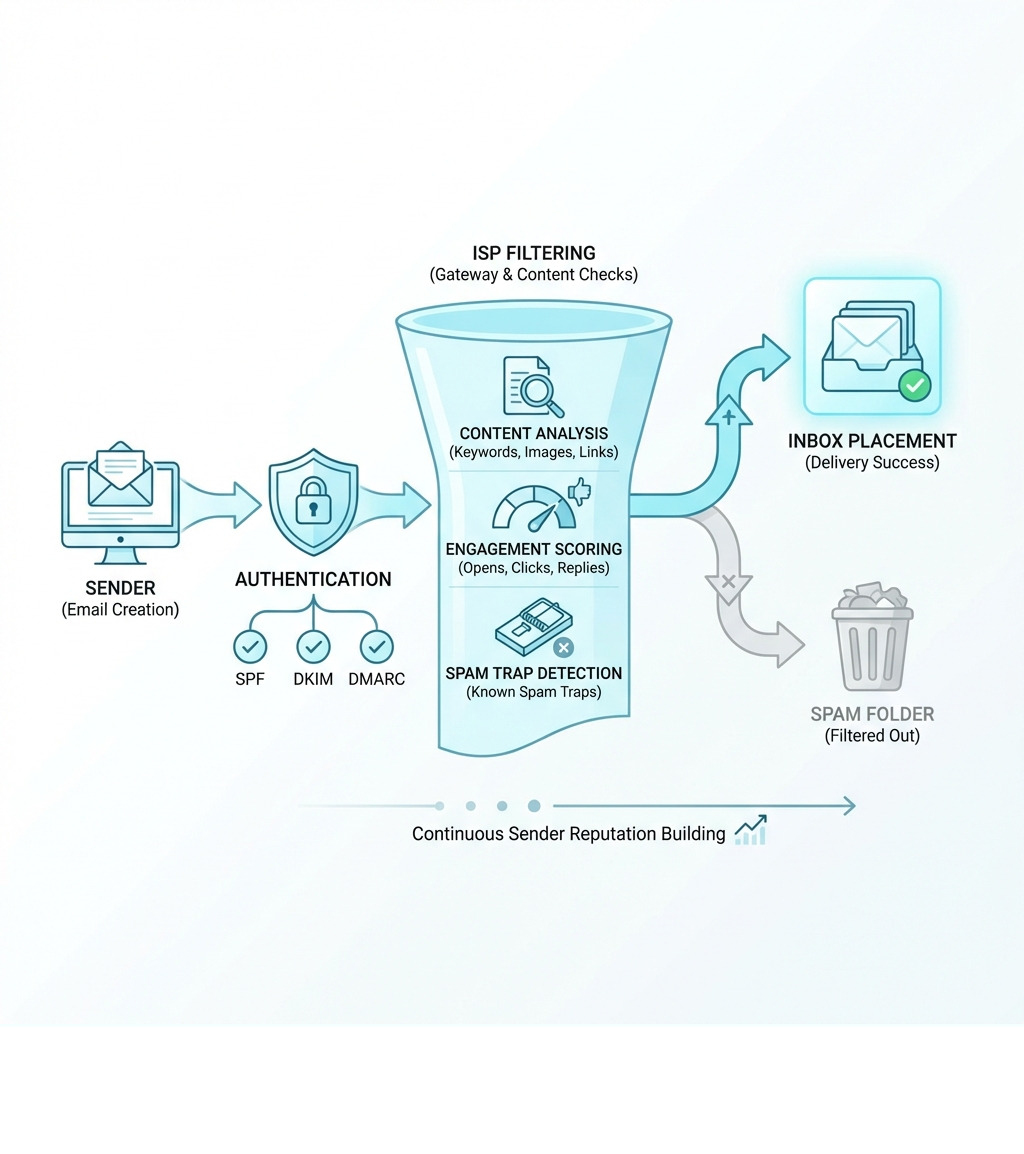
Email marketing deliverability tips definitions:
Essential Email Marketing Deliverability Tips for Inbox Success
To master email marketing, we first need to distinguish between “delivery” and “deliverability.” Delivery is simply whether the receiving server accepted your file. Deliverability is whether that file actually made it into the human’s inbox rather than the dreaded “Junk” folder. Think of it like a letter: delivery is the mailman putting it in the mailbox; deliverability is the recipient actually opening it instead of tossing it straight into the recycling bin.

At the heart of this is your sender score. This is a credit-score-like rating for your IP address and domain. If you have a high sender score, ISPs (Internet Service Providers) trust you. If it’s low, your emails are guilty until proven innocent. This creates an engagement loop: high engagement (opens and clicks) tells ISPs you are a “good” sender, which improves your deliverability, leading to even more engagement. Conversely, high bounce rates and spam complaints can tank your reputation overnight.
One major decision for businesses in Rhode Island and Massachusetts is whether to use a shared or dedicated IP address.
| Feature | Shared IP Address | Dedicated IP Address |
|---|---|---|
| Cost | Low (usually included in ESP plans) | Higher (often a paid add-on) |
| Reputation Control | Shared with other senders | Entirely in your hands |
| Volume Requirement | Good for low to mid-volume | Recommended for 25k+ emails/day |
| Maintenance | Handled by the provider | Requires manual “warming up” |
If you are sending a high volume of mail, a dedicated IP add-on might be the key to achieving those 99.5% delivery rates seen by major brands. To really understand how your specific audience is interacting with your mail, you should dive into advanced email analytics to identify where the friction lies.
Technical Email Marketing Deliverability Tips: Authentication
Authentication is how you prove to the world that you are who you say you are. Without it, you’re essentially sending anonymous mail, which is exactly what spammers do. Implementing email authentication is the single most important technical step you can take.
- SPF (Sender Policy Framework): A DNS record that lists which IP addresses are authorized to send email on behalf of your domain.
- DKIM (DomainKeys Identified Mail): Adds a digital signature to your emails, ensuring the content hasn’t been tampered with in transit.
- DMARC (Domain-based Message Authentication, Reporting, and Conformance): A policy that tells ISPs what to do if an email fails SPF or DKIM (e.g., “reject it” or “quarantine it”).
- BIMI (Brand Indicators for Message Identification): This allows your brand logo to appear next to your email in the inbox, providing a visual “verified” badge that boosts trust and open rates.
We always recommend that our clients verify your domain through their DNS settings immediately. It’s like showing your ID at airport security; it makes the whole process smoother and much more likely to result in a successful arrival.
List Hygiene and Opt-in Strategies
The quality of your list is far more important than the quantity. We’ve seen businesses with 50,000 subscribers get fewer sales than those with 5,000 highly engaged ones. Why? Because a bloated list is full of “spam traps” and “graymail.”
First and foremost: never, ever, purchase an email list. Purchasing email lists is the fastest way to get blocklisted. These lists are often riddled with spam traps—dormant email addresses used by ISPs to catch bad actors. If you hit one, your sender reputation is toast.
Instead, focus on a double opt-in process. This requires a new subscriber to click a link in a confirmation email before they are added to your list. While it adds “friction,” a good program should still have a 70% success rate. This ensures every person on your list actually wants to be there.
Our Recommended List Cleaning Steps:
- Identify Inactives: Flag anyone who hasn’t opened an email in 90-180 days.
- Run a Re-engagement Campaign: Send a “We miss you” email with a special offer.
- Implement a Sunset Policy: If they still don’t engage after the re-engagement attempt, scrub your list by removing them entirely.
- Automate Bounces: Ensure your ESP immediately removes “hard bounces” (invalid addresses).
Content-Based Email Marketing Deliverability Tips
Content isn’t just about what you say; it’s about how the ISP’s “robot” reads it. If your email is one giant image with no text, filters will flag it because they can’t “read” the image to see if it’s a scam.
We recommend a 60:40 text-to-image ratio. This provides enough context for filters while keeping things visually appealing for humans. Speaking of humans, they only spend an average of 8.97 seconds reading an email. You need to make those seconds count with personalization. Use personalization tokens (like the recipient’s first name) and dynamic content based on their past purchases.
Accessibility is another crucial factor. One billion people (15% of the world) have disabilities that affect how they interact with digital content. Following WCAG guide standards—like using alt-text for images and maintaining high color contrast—isn’t just the right thing to do; it actually improves your deliverability. Better accessibility leads to better engagement, which leads to better inbox placement.
Avoid “spammy” language in your email marketing subject lines. Words like “FREE,” “Act Now,” or “Miracle” are red flags. Instead, focus on providing genuine value. If you need a hand crafting the perfect campaign, our email marketing service can help you navigate these content minefields.
Managing Sending Volume and IP Warming
If you suddenly send 100,000 emails from a brand-new domain, ISPs will assume you’re a spammer who just bought a fresh IP. To prevent this, you must warm up an IP address gradually.
When switching to a new ESP, start by sending a very low number of emails—perhaps to your most engaged 200 subscribers—and double the volume daily. This process typically takes 30 to 60 days to reach full capacity.
Consistency is key. ISPs like predictable patterns. If you send 50,000 emails on Monday and zero for the rest of the month, it looks suspicious. Try to maintain a steady cadence. If you find your subscribers are getting “communications fatigue,” provide a preference center so they can choose to receive emails weekly instead of daily. This keeps them on your list rather than forcing them to hit “Unsubscribe.”
Monitoring Performance and Deliverability Tools
You can’t fix what you don’t measure. We use a variety of tools to keep a pulse on our clients’ deliverability health.
- Seed Addresses: We send test emails to a “seed list” of addresses across different providers (Gmail, Outlook, Yahoo) to see exactly where they land.
- Feedback Loops: We subscribe to feedback loops which alert us every time a subscriber marks an email as spam. This allows us to remove them immediately and investigate why they were unhappy.
- Google Postmaster Tools: This is a must-have. Google Postmaster Tools provides a dashboard showing your domain reputation, spam rate, and authentication errors specifically for Gmail users.
- Microsoft SNDS: Similar to Google, Microsoft SNDS gives us insights into how Outlook and Hotmail view your sending IP.
- Blocklist Checks: Regularly perform a blocklist check to ensure your IP hasn’t been flagged by a major provider.
If you see your open rates dropping, it’s time to run an A/B test. Try different subject lines or send times to see what resonates. Constant testing is the only way to stay ahead of evolving algorithms.
Legal Compliance and Evolving Standards
Compliance isn’t just about avoiding fines; it’s about building trust. In the US, the CAN-SPAM Act is the law of the land. It requires you to:
- Include a clear, conspicuous way to unsubscribe.
- Honor unsubscribes within 10 business days.
- Include your physical postal address in every email.
- Never use deceptive subject lines.
If you have customers in Europe, you must also comply with GDPR, which requires “explicit consent”—meaning no pre-checked boxes on your sign-up forms.
ISPs also have their own rules. We recommend all our clients regularly review the Gmail guidelines and Yahoo guidelines. These providers recently updated their requirements to mandate DMARC for bulk senders, proving that technical standards are always in flux.
Conclusion: Future-Proofing Your Email Strategy
Mastering email deliverability is an ongoing process, not a “set it and forget it” task. As ISPs become more sophisticated and user expectations rise, the margin for error shrinks. For businesses in Rhode Island and Massachusetts, maintaining a pristine sender reputation is the foundation of a high-ROI digital marketing strategy.
At JPG Designs, we specialize in more than just beautiful websites. Our mobile-first approach ensures that your emails and landing pages look perfect on every device, which is a major factor in maintaining the engagement levels that ISPs love to see. By combining technical expertise in authentication and infrastructure with a deep understanding of user behavior, we help our clients stay out of the spam folder and in front of their customers.
Ready to take your email marketing to the next level? Whether you need to fix a tanking sender reputation or build a high-performance campaign from scratch, we’re here to help. Explore our digital marketing services or contact us today to see how we can help your business thrive in the inbox.