

Why Knowing How to Track Email Changes the Way You Do Business
How to track email is something every business owner sending outreach, proposals, or support messages eventually needs to understand. Did your prospect actually open that quote you sent? Did your client read the follow-up? Without tracking, you’re guessing.
Here’s a quick overview of the main ways to track an email:
- Use a tracking pixel – Install a browser extension like Mailtrack or Streak in Gmail. A tiny invisible image is embedded in your email. When the recipient opens it, you get notified instantly.
- Read email headers – Open any received email and view its full source (in Gmail: click the three-dot menu → Show Original). The “Received” lines reveal the sender’s IP address and server path.
- Request a read receipt – Available in Gmail (G Suite), Outlook, and Yahoo Mail. The recipient must approve it, so it’s less reliable than pixel tracking.
- Use an email marketing platform – Tools like HubSpot, Mixmax, or ActiveCampaign track opens, clicks, devices, and locations automatically across bulk sends.
The stakes are real. Hundreds of billions of emails are sent every day worldwide, and a significant portion of them are already tracking the people who receive them — yet many recipients don’t even know it’s happening. Meanwhile, sending a follow-up email right after someone opens your first one increases your reply rate by 80%.
Whether you want to know when a sales prospect reads your proposal, trace a suspicious email back to its source, or improve a marketing campaign with real engagement data — this guide covers it all, step by step.
I’m Jeff Pratt, owner of JPG Designs, a digital marketing agency with extensive experience helping businesses build smarter, more measurable online systems — including learning how to track email as part of a complete digital marketing strategy. Let’s walk through everything you need to know, from tracking pixels to email headers to the legal lines you shouldn’t cross.
Related content about How to track email:
How to Track Email: Methods and Technology
To master how to track email, we first need to understand the different technologies working behind the scenes. While many people use the terms interchangeably, there are distinct differences between tracking, read receipts, and delivery notifications.
| Feature | Email Tracking (Pixels) | Read Receipts (MDN) | Delivery Status (DSN) |
|---|---|---|---|
| Mechanism | Invisible 1×1 pixel image | RFC 8098 Header | SMTP Protocol command |
| User Consent | Not required (usually) | Recipient must click “Yes” | Automated by server |
| Data Provided | Opens, clicks, device, IP | Time of “Read” status | Success/Failure/Delay |
| Reliability | High (unless images blocked) | Low (often ignored) | High for delivery status |
When we send an email, it travels through a series of “hops” across different servers using the SMTP protocol. A Delivery Status Notification (DSN) tells us if the email actually landed in the recipient’s inbox or “bounced” back. However, a DSN doesn’t tell us if the human on the other end actually looked at it.
That’s where Message Disposition Notifications (MDN), commonly known as read receipts, come in. These are official requests built into the email’s metadata. The problem? Most modern email clients allow users to disable these or simply ignore the prompt. If you want to know how to track email with high accuracy, you need a more sophisticated approach.
Understanding How to Track Email with Pixels
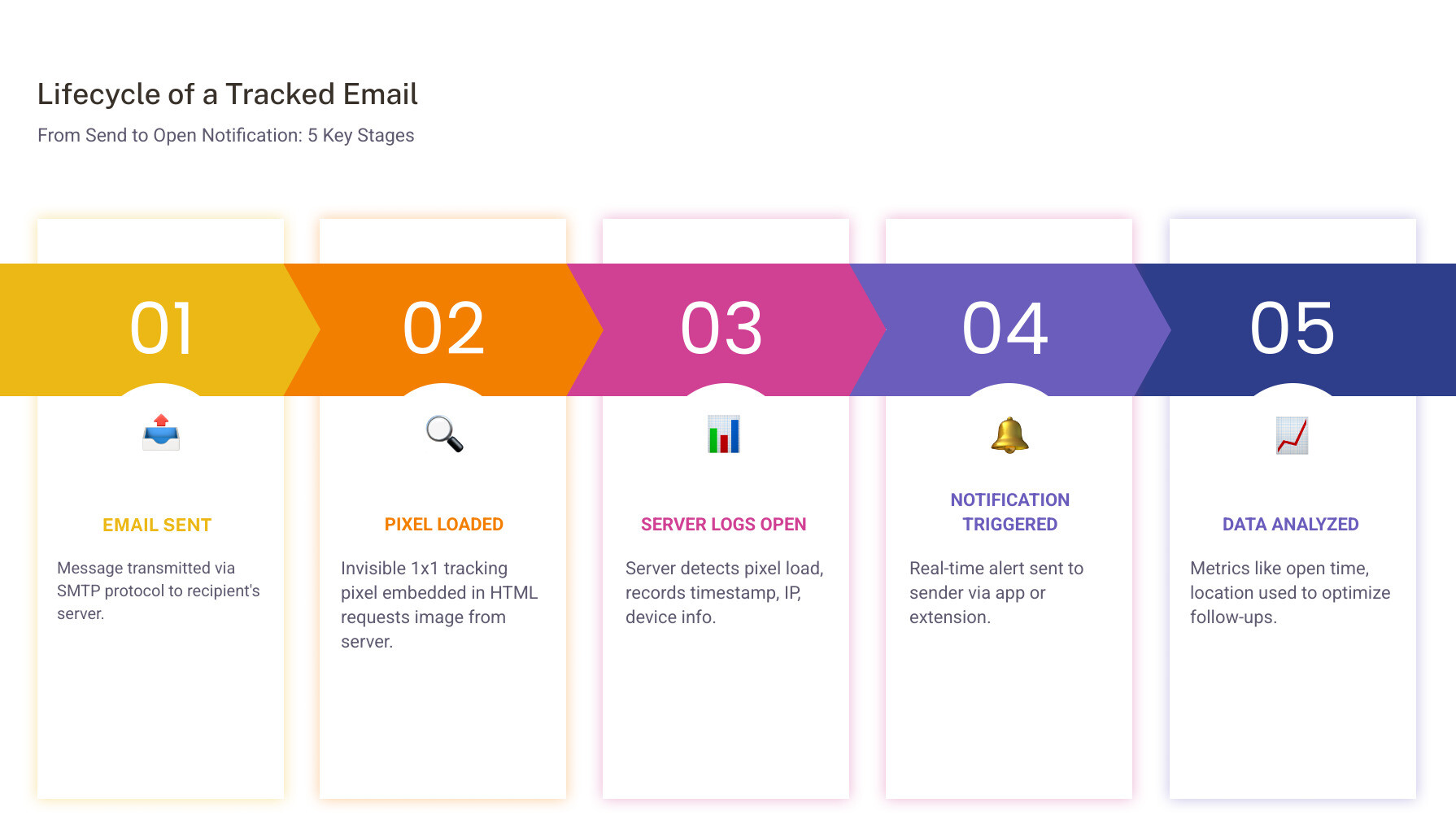
The gold standard for modern email monitoring is the tracking pixel. This is an invisible, 1×1 pixel image embedded into the HTML of your message.
When the recipient opens the email, their email client (like Gmail or Outlook) requests that tiny image from the tracking service’s server. This request acts as a notification trigger. Because the request includes the recipient’s IP address and the time of the request, the sender receives a real-time alert.
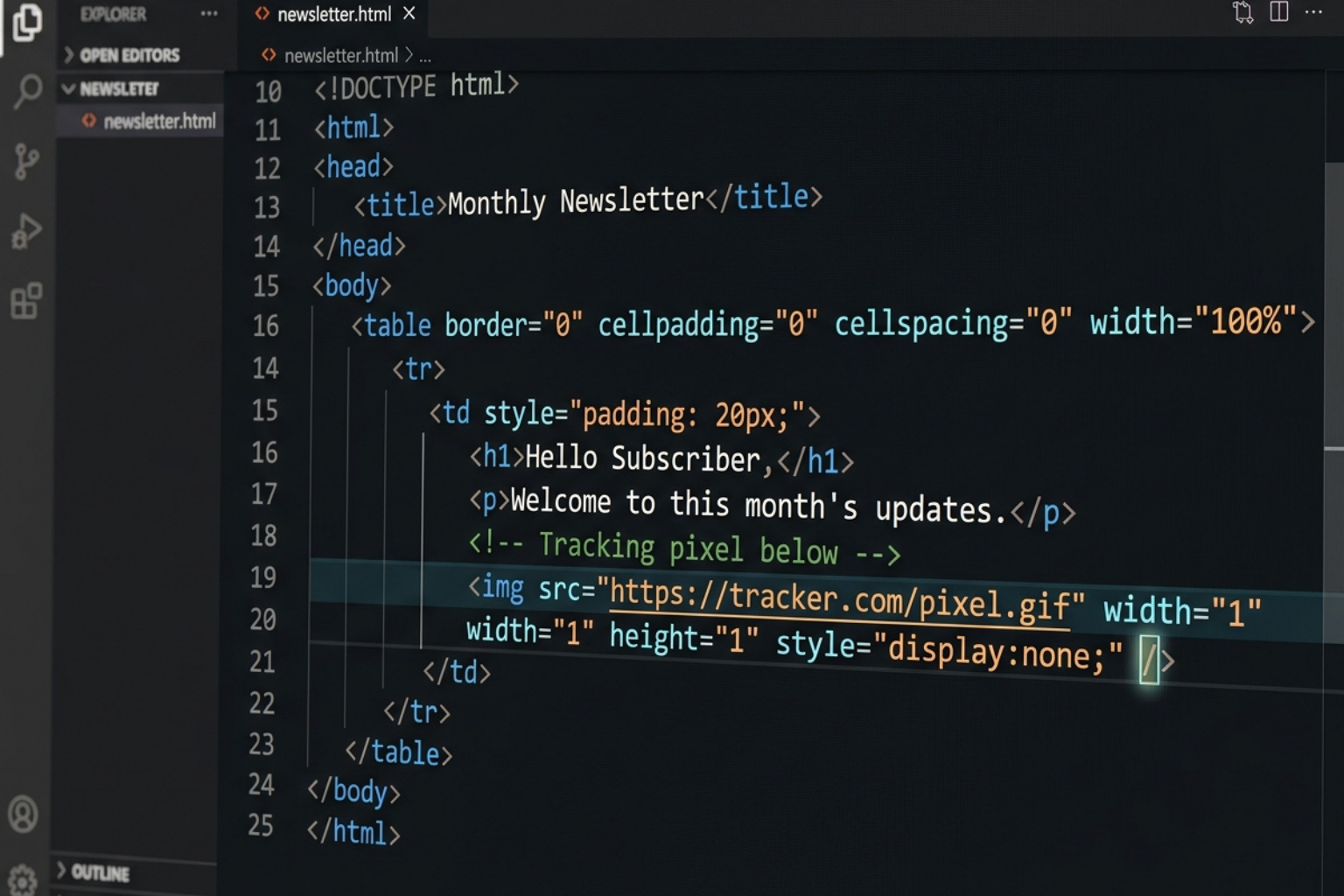
At JPG Designs, we often discuss unlocking the power of email through these “web beacons.” They provide a wealth of data, including:
- Exact time and date of every open.
- How many times the email was reopened (a great sign of high interest!).
- The device used (mobile vs. desktop).
- General location based on the IP address.
By using transparent trackers, you can monitor engagement without cluttering the recipient’s experience with clunky “Read Receipt” pop-ups.
Step-by-Step: How to Track Email in Gmail and Outlook
If you are wondering how to track email in your daily workflow, the easiest way is through browser extensions or native settings.
For Gmail Users:
- Install an Extension: Tools like Mailtrack, Streak, or HubSpot are popular choices. You can find these in the Google Workspace Marketplace or Chrome Web Store.
- Enable Tracking: Once installed, you will see a small icon (often a double checkmark or an eye) in your “Compose” window. Ensure it is toggled on.
- Send and Monitor: After sending, check your “Sent” folder. Most tools use a color-coded system—one checkmark means sent, two green checkmarks mean opened.
For Outlook Users:
- Native Read Receipts: Go to the “Options” tab while composing and check “Request a Read Receipt.”
- Third-Party Add-ins: For pixel-based tracking similar to Gmail, install add-ins like SalesHub or Mixmax. These provide much deeper advanced email analytics than the standard Outlook receipt.
Other Providers:
- Apple Mail: Usually requires a third-party plugin like Mailbutler.
- Yahoo & Hotmail: These web-based services generally require a browser extension (like Mailtrack for Chrome) to enable pixel tracking.
Tracing Senders via Email Headers and IP Addresses
Sometimes, the goal isn’t to track an email you sent, but to trace one you received. This is vital for identifying the source of suspicious messages or verifying a sender’s identity.
Every email contains a “header”—a block of technical metadata that acts like a digital passport. It records every server the email touched on its way to you.
How to view headers:
- In Gmail: Open the email, click the three dots (More) next to the reply button, and select “Show Original.”
- In Outlook: Open the email in a new window, go to File → Properties → Internet Headers.
To trace the sender, look for the “Received” lines. The one at the very bottom of the list usually contains the originating IP address. You can copy this IP and paste it into tools like IPinfo or AbuseIPDB to see the sender’s approximate geolocation and whether the IP has been flagged for spam.
We also recommend checking the authentication status:
- SPF (Sender Policy Framework): Does the sending server have permission to send for that domain?
- DKIM (DomainKeys Identified Mail): Is there a digital signature proving the email wasn’t tampered with?
- DMARC: A policy that tells servers what to do if SPF or DKIM fails.
If these show a “Fail” status, be extremely cautious—the email is likely spoofed.
Best Practices and Legal Considerations for Email Tracking
At JPG Designs, we believe that data should drive your digital marketing strategy. However, knowing how to track email comes with a responsibility to use that data ethically. Whether you are in Rhode Island, Massachusetts, or serving clients globally, maintaining trust is paramount.
Interpreting Data to Improve Business ROI
Data is only useful if you know what to do with it. Simply seeing that an email was opened isn’t enough; you need to look at the Key Performance Indicators (KPIs) to make smart moves.
Real-world applications for tracking data:
- Sales Follow-ups: If a lead opens your proposal ten times in one hour, they are likely discussing it internally. This is the perfect time to call and answer any questions.
- Venture Capital & Startups: VCs often receive over 6,000 emails a month. If you’re a founder, seeing that a VC clicked your pitch deck link three times is a signal to prioritize that relationship.
- Customer Support: If a client says they never received instructions, but your tracker shows they opened the email five times, you can gently pivot the conversation to see where the confusion lies.
- List Pruning: If a segment of your list hasn’t opened an email in six months, remove them. This improves your deliverability and ensures your ROI of $36 for every $1 spent stays high.
Privacy, Ethics, and GDPR Compliance
Is email tracking legal? Yes, but there are strict rules, especially regarding the General Data Protection Regulation (GDPR) in Europe and similar privacy laws appearing in the United States.
To stay on the right side of ethics and the law:
- Be Transparent: Include a mention in your privacy policy that you use tracking technologies to improve user experience.
- Provide Opt-Outs: Always include a clear “Unsubscribe” link in marketing or bulk emails.
- Internal Guidelines: Establish company-wide rules for when it is appropriate to mention tracking data to a client. (Tip: Don’t say “I saw you opened my email at 2:00 AM.” Instead, say “I wanted to follow up and see if you had any questions about the proposal.”)
- Consent: For high-level tracking in certain jurisdictions, you may need explicit consent before firing a tracking pixel.
Overcoming Limitations and Accuracy Issues
No tracking method is 100% accurate. As a business owner, you should be aware of “false positives” and “false negatives.”
- Apple Mail Privacy Protection: Apple now “pre-loads” images on their servers. This can make it look like an email was opened the second it was delivered, even if the user never touched it.
- Image Blocking: Many corporate email servers block external images by default. If the pixel doesn’t load, the open isn’t recorded.
- VPNs and Proxies: If a sender or recipient uses a VPN, the location data will show the VPN server’s location (e.g., Chicago) rather than the person’s actual city (e.g., Providence).
- Pixel Caching: Google sometimes caches images on their own servers, which can occasionally obfuscate the exact device or location of the recipient.
Conclusion: Mastering Your Inbox
Learning how to track email is about more than just “spying” on opens. It is a powerful tool for improving your Google rankings and overall business visibility by ensuring your communication is reaching the right people at the right time.
By combining pixel tracking for your outreach and header analysis for your security, you gain a level of control over your inbox that most users never realize is possible. Remember to use these tools ethically, respect privacy laws, and always focus on providing value to your recipients.
Ready to take your digital presence to the next level? Whether you need a mobile-first website or a high-converting email strategy, contact us at JPG Designs today. We specialize in helping businesses across Rhode Island and Massachusetts grow through data-driven marketing.