Why Your Unclaimed GBP is Costing You Customers
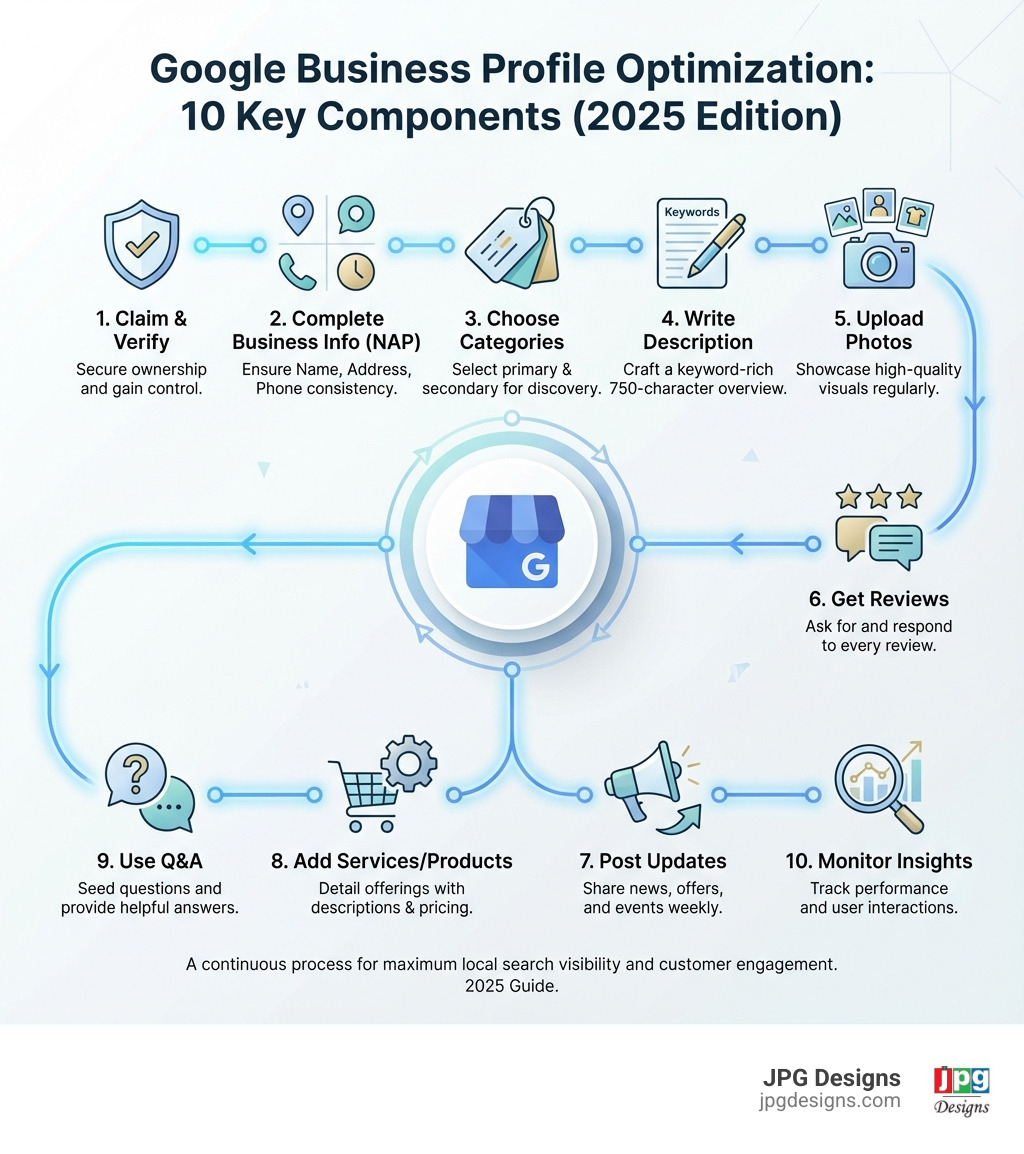
If you are wondering how to optimize GMB profile, here is the quick, actionable checklist you can follow today:
- Claim and verify your Google Business Profile
- Complete every section – business name, address, phone, hours, website
- Choose the right categories – primary category is critical for “near me” searches
- Write a keyword-rich description – use all 750 characters strategically
- Upload high-quality photos – exterior, interior, team, and work in progress
- Collect and respond to reviews – ask customers and reply to every review
- Post regular updates – weekly posts signal an active business to Google
- Add products/services – detailed descriptions with pricing
- Use the Q&A feature – seed your own questions and monitor new ones
- Maintain NAP consistency – ensure your name, address, and phone match everywhere online
If you are a local business owner, your Google Business Profile (formerly Google My Business) is arguably the most important piece of digital real estate you own. It is not your website or social media. It is your Google Business Profile.
Why does this matter so much? Because 46% of all Google searches are for local businesses. Many of those searches are “zero-click,” meaning people never leave Google. About half of local searchers click a Map Pack listing before ever visiting a website. They can find your hours, phone number, reviews, and photos directly in your profile.
The pain point: if your profile is incomplete or unclaimed, you are almost invisible. The typical profile gets only about 1,260 views per month with less than a 5% action rate, simply because it is weakly optimized or ignored.
Meanwhile, competitors who have taken the time to optimize their profiles are seeing dramatically better results: more calls, more direction requests, and more website visits from people who are ready to buy.
They are not doing anything mysterious. They have a clear strategy for how to optimize GMB profile settings and keep everything current.
You know you need a strong online presence, but keeping up with Google’s constant updates feels like a full-time job. You are busy running your business, not chasing algorithm changes.
That is exactly what this guide is designed to solve. You will learn, step by step, how to optimize your Google Business Profile so you stop being invisible and start showing up where your customers are actually looking: in Google Search and Google Maps.
I am Jeff Pratt, owner of JPG Designs. With extensive experience in strategic digital marketing, I have optimized hundreds of Google Business Profiles to rank in the local 3-pack and drive customer actions like calls, directions, and bookings.
Throughout this article, we will keep coming back to one core idea: when you know how to optimize GMB profile elements the right way, your listing becomes a reliable, always-on customer acquisition channel instead of a forgotten placeholder.
The Foundation: Claiming, Verifying, and Completing Your Profile
Before optimizing, you must claim, verify, and complete your profile. This is the essential foundation for your online presence.
Claiming Your Profile
Many businesses in Rhode Island and Massachusetts already exist on Google Maps. Your first step is to claim ownership of this listing. If you’re starting fresh, you’ll need to create a new one.
- Search for your business: Go to https://www.google.com/ and search for your business name and location (e.g., “JPG Designs Rhode Island”).
- Claim or create:
- If a listing exists, click “Own this business?” or “Manage now” and follow the prompts.
- If no listing appears, go to https://google.com/business/ or https://business.google.com/add and click “Manage Now” to start a new profile.
Verifying Your Business
Verification proves to Google you’re the legitimate owner, which is crucial for visibility and a key step to fully optimize GMB profile.
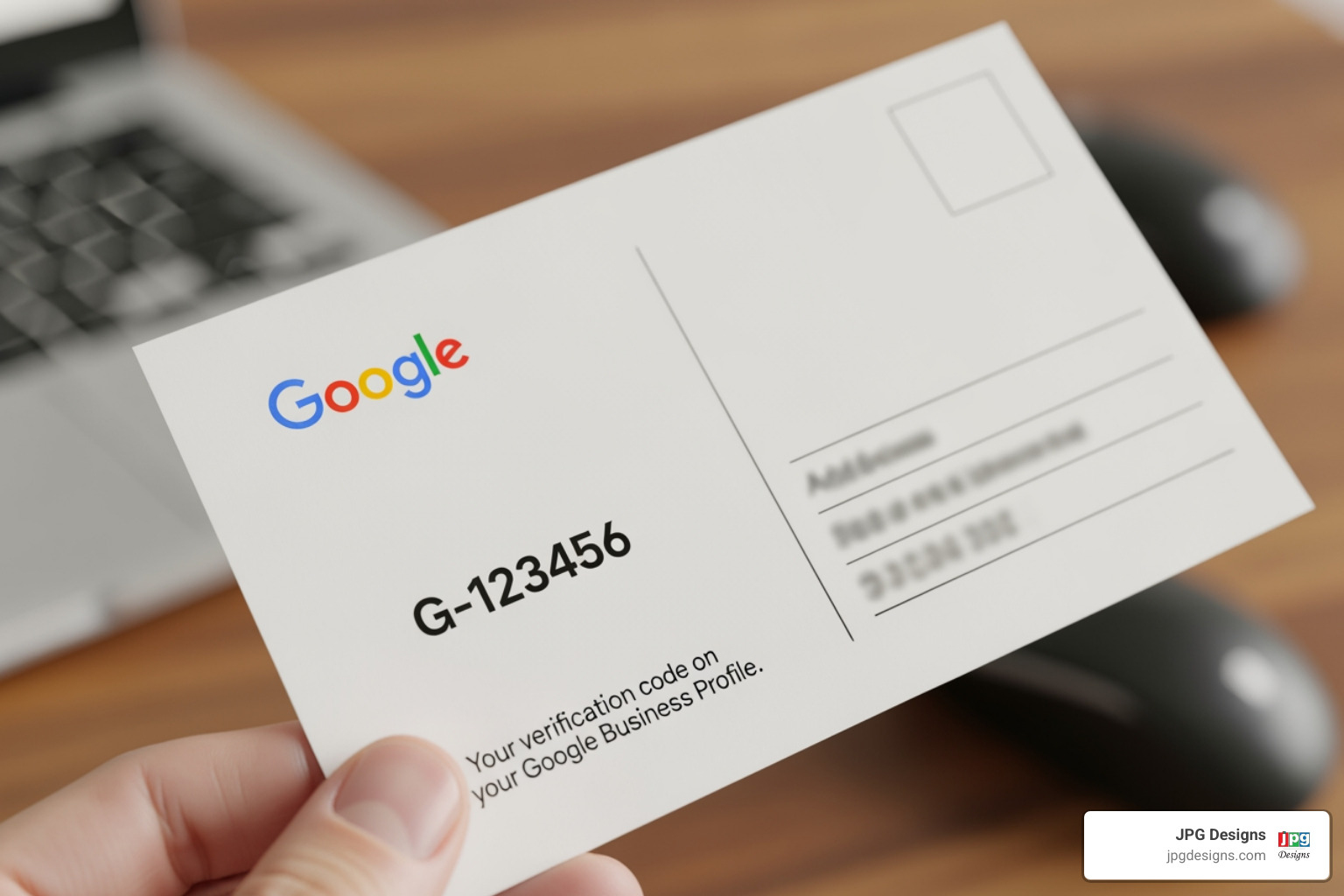
- Postcard verification: The most common method. Google sends a postcard with a code to your physical business address.
- Phone verification: Some businesses may be eligible to receive a code via text or automated call.
- Email verification: Occasionally offered, allowing verification via an email associated with your business.
- Instant verification: If you’ve already verified your website with Google Search Console using the same Google account, you might be instantly verified.
Core Business Information: NAP Consistency
Next, complete your core business information. NAP (Name, Address, Phone) consistency is a major local ranking factor.
- Business Name: Use your exact, legal business name. Avoid keyword stuffing (e.g., “JPG Designs – Web Design & SEO Rhode Island”) unless it’s part of your registered name, as this can lead to suspension.
- Address: If customers visit you, enter your full street address. If you’re a service-area business (SAB) serving customers at their locations (like a plumber in Massachusetts), clear your address and list only your service areas.
- Phone Number: Provide a local phone number.
- Website URL: Link to your official website. We recommend using UTM tracking parameters to measure traffic from your GBP in Google Analytics.
- Business Hours: Accurately list your regular operating hours.
- Holiday Hours: Google allows you to set special hours for holidays. This is vital for customer satisfaction.
Ensuring this information is accurate and consistent across your Google Business Profile, website, and other online directories is fundamental to building trust with Google and your customers.
How to Optimize Your GMB Profile for Maximum Visibility
Now that your foundation is solid, let us dive into the components that directly impact your ranking and visibility in local search and the Map Pack. This is where you really apply the principles behind how to optimize GMB profile for measurable results.
Step-by-Step: How to Optimize GMB Profile Categories and Services
Choosing the right categories is one of the most impactful steps in this process. A huge portion of profile views comes from people who search by type of business rather than by name.
- Primary Category: This is your most crucial choice. Select the single category that best describes your core business. Be specific. If you are a “Web Designer,” choose that over “Marketing Agency” if web design is your primary service. Google’s algorithm relies heavily on this choice.
- Secondary Categories: Add additional categories only for services you truly offer. For instance, JPG Designs might list “Internet Marketing Service” or “SEO Consultant” as secondary categories.
- Specificity is Key: If you are an “HVAC Contractor,” do not just put “Contractor.” The more precise you are, the easier it is for Google to understand exactly what you do.
Once your categories are set, reinforce them with detailed products and services. This is a practical way to use keywords and clarify your offer for both Google and your customers.
- Listing Products: If you sell physical products, add names, descriptions, prices, and photos. Make it easy for searchers to see what you sell at a glance.
- Listing Services: If you are service-based, create a separate entry for each service, using clear and descriptive language.
- Service Descriptions: Explain what each service includes and how it helps the customer.
- Pricing: Add pricing or price ranges where possible to set expectations and reduce friction.
- Keywords: Naturally weave in phrases that people in Rhode Island and Massachusetts actually type into Google when they are looking for help.
By carefully filling out your categories and services, you send strong relevance signals to Google. This is one of the most direct, controllable ways to optimize GMB profile content for local search success.
More on our Local SEO services
Crafting the Perfect Business Description and Attributes
Your business description and attributes give you space to answer a simple customer question: “Why should I choose you?” Done well, they are a powerful part of how to optimize GMB profile content so it converts.
-
Business Description: You have a 750-character limit.
- Front-load Important Info: The first 244 characters are visible without a click, so include who you are, what you do, and where you do it.
- Using Keywords Naturally: Integrate phrases customers in Rhode Island and Massachusetts would use, but keep the text natural and easy to read.
- What to Avoid: Do not include links, HTML, or spammy, over-promotional wording.
- Entity Alignment: Keep the way you describe your services and locations consistent with your website so Google clearly understands your business.
-
What are Attributes? Attributes are structured details that highlight what you offer.
- Factual Attributes: Objective details like “Wi-Fi,” “Outdoor Seating,” or “Wheelchair Accessible.”
- Subjective Attributes: Crowd-sourced impressions like “Good for Kids” that reflect customer experiences.
- Accessibility: Call out features such as wheelchair-accessible entrances or restrooms.
- Amenities: Mention conveniences like free Wi-Fi or restrooms.
- Offerings: Highlight options such as online appointments, delivery, or curbside pickup.
Check out this attribute list
Thoughtful descriptions and attributes do two things at once: they speak directly to customer pain points (accessibility, convenience, trust) and help Google match your profile with more specific, high-intent searches.
The Power of Visuals: Optimizing Photos and Videos
Visuals are critical to both trust and visibility. People want to see what they are getting before they call, click, or visit.

- Significance of Photos: Listings with strong visuals are more likely to be perceived as reputable, and they tend to generate more actions like calls and direction requests.
- Photo Quantity Impact: Adding more high-quality, relevant photos gives Google and customers a clearer picture of your business.
- Photo Quality: Use sharp, well-lit images that accurately represent your space and work.
- Types of Photos:
- Exterior: Help people recognize your location from the street.
- Interior: Show what customers can expect when they walk in.
- Products/Services: Highlight your best work or top sellers.
- Team Photos: Put a face to your business to build trust.
- “At Work” Photos: Show your team in action to demonstrate professionalism.
- Branded Graphics: Include your logo and a strong cover photo.
- Types of Photos:
- Google’s photo guidelines: Follow these rules so your photos are approved and displayed correctly.
- Geo-tagging Photos: When appropriate, using location data in your image files can reinforce your connection to your service areas.
- Video Optimization: Short, clear videos can quickly communicate what makes your business different.
- 360º Photos: Use a 360º view to let people virtually step inside your location.
- Customer-uploaded Photos: You cannot control everything customers upload, but you can consistently add better photos so your brand image stays strong.
Consistently adding and updating visuals is a practical, ongoing way to optimize GMB profile performance. Fresh photos and videos show both customers and Google that your business is active, real, and ready to help.
Engaging Customers and Building Trust on Your Profile
An optimized profile is not a static listing; it is an active communication channel. When you use it to answer questions, showcase service, and respond to feedback, you build trust and create the kinds of engagement signals Google rewards.
Managing Reviews and Q&A: How to Optimize GMB Profile for Trust
Customer reviews are at the heart of local online reputation. They also play a direct role in how visible you are in local search.
- Impact of Reviews on Ranking: Businesses with more recent, positive, and detailed reviews tend to perform better in the Map Pack and local results.
- Best Practices for Getting Reviews:
- Ask Proactively: Many happy customers will not leave a review unless you make a clear, simple request.
- Make it Easy: Create a direct review link and include it in emails, texts, receipts, or thank-you messages.
- Timing Matters: Ask shortly after a project is completed or a positive interaction.
- Guide (Not Script) Reviews: Invite customers to mention the specific service and location, for example, “web design project in Providence, RI.”
- Responding to All Reviews:
- Positive Reviews: Thank the customer, reference what they mentioned, and reinforce your commitment to good service.
- Negative Reviews: Stay calm, professional, and empathetic. Acknowledge the issue, avoid blame, and invite the reviewer to continue the conversation privately so you can resolve the problem.
- Handling Negative Reviews: You cannot remove a review just because it is critical. Only reviews that break Google’s review policy can be flagged for removal. Over time, a steady flow of honest, positive reviews will outweigh the occasional negative one.
- Google Q&A Feature: This is a powerful but often overlooked part of how to optimize GMB profile engagement.
- Seeding Your Own Questions: Add common questions customers ask about your services and locations, then answer them clearly.
- Answering Public Questions: Check regularly for new questions and respond quickly with accurate, helpful information.
By actively managing reviews and Q&A, you address real customer concerns (trust, risk, clarity) while also supplying Google with fresh, keyword-rich content connected to your business.
Leveraging Google Posts, Messaging, and Bookings
Your Google Business Profile can operate like a mini-website and messaging hub right inside search results. Using Posts, Messaging, and Bookings helps turn casual searchers into real leads.
- Google Posts: These short updates appear directly in your profile.
- Post Types: Use Offers, Updates, and Events to highlight promotions, new services, or important announcements.
- Post Frequency: Aim for at least one post per week so your profile always looks active and up to date.
- Call-to-actions (CTAs): Add a clear CTA such as “Learn More,” “Call Now,” or “Book” so customers know what to do next.
- Enabling Messaging: This feature lets potential customers reach you with a quick question right from your profile.
- Benefits of Direct Contact: Many people prefer sending a quick message instead of making a phone call. Fast, friendly responses can win them over before they contact a competitor.
- Mobile-First Advantage: Since a large percentage of local searches happen on smartphones, messaging lines up perfectly with how customers actually behave.
- Why you need to optimize for mobile users: Aligning your GBP, website, and messaging strategy with mobile habits can significantly increase conversions.
- Setting Up Bookings: If you rely on appointments, do not make people hunt around for a way to schedule.
- Appointment Links: Add a direct link to your online booking or contact page so customers can take the next step immediately.
- Reserve with Google: Where available, connect your scheduling system so customers can book from within your profile.
When you combine reviews, Q&A, Posts, Messaging, and Bookings, your Google Business Profile stops being a static listing and starts acting like a live, always-on sales and support channel. This is a key part of how to optimize GMB profile performance for both visibility and conversions.
Advanced Strategies and Troubleshooting
Once you have the essentials in place, you can refine your approach with more advanced strategies and be prepared to handle common issues that might otherwise stall your visibility.
Using Insights and Managing Multiple Locations
To keep improving, you need to see what is working and what is not. Google Business Profile Insights gives you data you can act on.
- Google Business Profile Insights: Use this tool to understand how people are finding and using your profile.
- Tracking Performance: See whether people find you by searching your name (direct) or by searching for what you do (findy).
- Search vs. Maps: Learn whether customers interact with your business more in Google Search or on Google Maps.
- Clicks and Actions: Track clicks to your website, calls generated from your profile, and requests for directions.
- Calls: Identify patterns in when people call so you can staff and respond accordingly.
- Direction Requests: See which areas people are coming from, and compare that with your target markets in Rhode Island and Massachusetts.
- Using UTMs for better tracking: Add UTM parameters to your website link so you can clearly attribute traffic and leads from GBP inside Google Analytics.
If you manage more than one location, you need a structure that keeps everything consistent and organized.
- Multi-location Management:
- Bulk Verification: If you have many locations, see whether you qualify for bulk verification to streamline the process.
- Store Codes: Give each location its own store code to avoid confusion and keep data clean.
- Labels: Use labels (such as “Providence” or “Boston-suburbs”) to group and compare locations.
- Service-Area Business Optimization: If you visit customers at their locations instead of serving them at a storefront, adjust your setup accordingly.
- Clear Address: Hide your physical address if customers do not come to you.
- Service Areas: List the cities, counties, or ZIP codes you serve so you can show up for relevant “near me” and location-based searches.
Using Insights and multi-location tools this way turns your optimization into an ongoing cycle: measure, adjust, and improve.
Handling Common GBP Issues
Even well-managed profiles sometimes run into issues. Knowing what to do next is part of understanding how to optimize GMB profile performance over the long term.
- Profile Suspensions: Google may suspend profiles for policy violations such as keyword stuffing or inaccurate addresses.
- Review the guidelines, correct any problems, and submit a reinstatement request with clear documentation.
- Ownership Transfers: If you purchase a business or take over its marketing, you may need to request ownership of the existing profile through Google’s process.
- Merging Duplicate Listings: Duplicate listings can split your reviews and confuse both customers and search engines.
- Identify duplicates and request that Google merge or remove them so only the correct listing remains.
- Reporting Spam or Fake Listings/Reviews:
- Reporting Spam Listings: If another listing breaks the rules or misrepresents a business, submit a report through the Business Redressal Complaint Form so Google can review it.
- Reporting Fake Reviews: If a review violates Google’s review policy, flag it directly from your GBP dashboard for evaluation.
- Google Business Profile Help Community: If you get stuck, this community and the related help resources can guide you through unusual or complex issues.
By combining solid day-to-day optimization with these advanced tactics and troubleshooting steps, you keep your profile healthy, visible, and ready to convert new customers.
Frequently Asked Questions about GBP Optimization
What are the main factors for local ranking on Google?
Google’s local ranking algorithm primarily considers three factors:
- Relevance: How well your Business Profile matches what someone is searching for. A complete and active Google Business Profile signals relevance to Google.
- Distance: How far each potential business is from the person searching. Google uses location information if the user doesn’t specify a location.
- Prominence: How well-known a business is. This is influenced by factors like the number of reviews, your overall rating, links to your website, and your overall web presence. An optimized and active GBP directly contributes to your prominence.
A complete and active Google Business Profile signals relevance and prominence to Google, directly impacting your local ranking.
How long does it take to see results from optimizing my GMB profile?
While some changes are instant (like updated hours), seeing a significant impact on rankings can take a few weeks to a few months as Google re-crawls your profile and assesses its new, improved quality and engagement signals. Consistency in your optimization efforts is crucial for long-term results. Don’t expect miracles overnight, but expect steady improvement with diligent work.
Can I remove a bad review from my Google Business Profile?
You cannot remove a review simply because it’s negative. You can only flag a review for removal if it violates Google’s review policy (e.g., it’s spam, fake, or contains hate speech). The best strategy is to respond professionally to the negative review, offering to resolve the issue directly. Your thoughtful response can often turn a negative into a positive, showing potential customers that you care.
Conclusion: Turn Your Profile into a Customer Magnet
By now, you have seen how each part of your listing contributes to the bigger picture of how to optimize GMB profile performance:
- Claiming, verifying, and fully completing your profile
- Choosing accurate categories and detailed products/services
- Writing a clear, keyword-informed description and selecting the right attributes
- Showcasing your business with strong photos and videos
- Actively managing reviews, Q&A, Posts, Messaging, and Bookings
- Using Insights and advanced settings to refine and protect your visibility
The key takeaway is simple: your Google Business Profile is not a set-it-and-forget-it directory entry. It is a living asset that needs regular attention. Fresh photos, updated hours, new posts, and consistent review management all signal to Google that your business is active and relevant to searchers in Rhode Island and Massachusetts.
Done right, your GBP becomes the cornerstone of a strong local SEO strategy. It helps you control your narrative, answer customer questions before they even contact you, and turn local searches into real revenue.
If you are ready to stop blending into the background and start dominating local search, JPG Designs can help you put all of this into action. From mobile-first website design to targeted local SEO and profile optimization, our team builds systems that make it easier for customers to find and choose you.
For expert help in changing your online presence and turning your Google Business Profile into a true customer magnet, explore our Digital Marketing Services.