Why Your Fundraising Page Can Make or Break Your Campaign
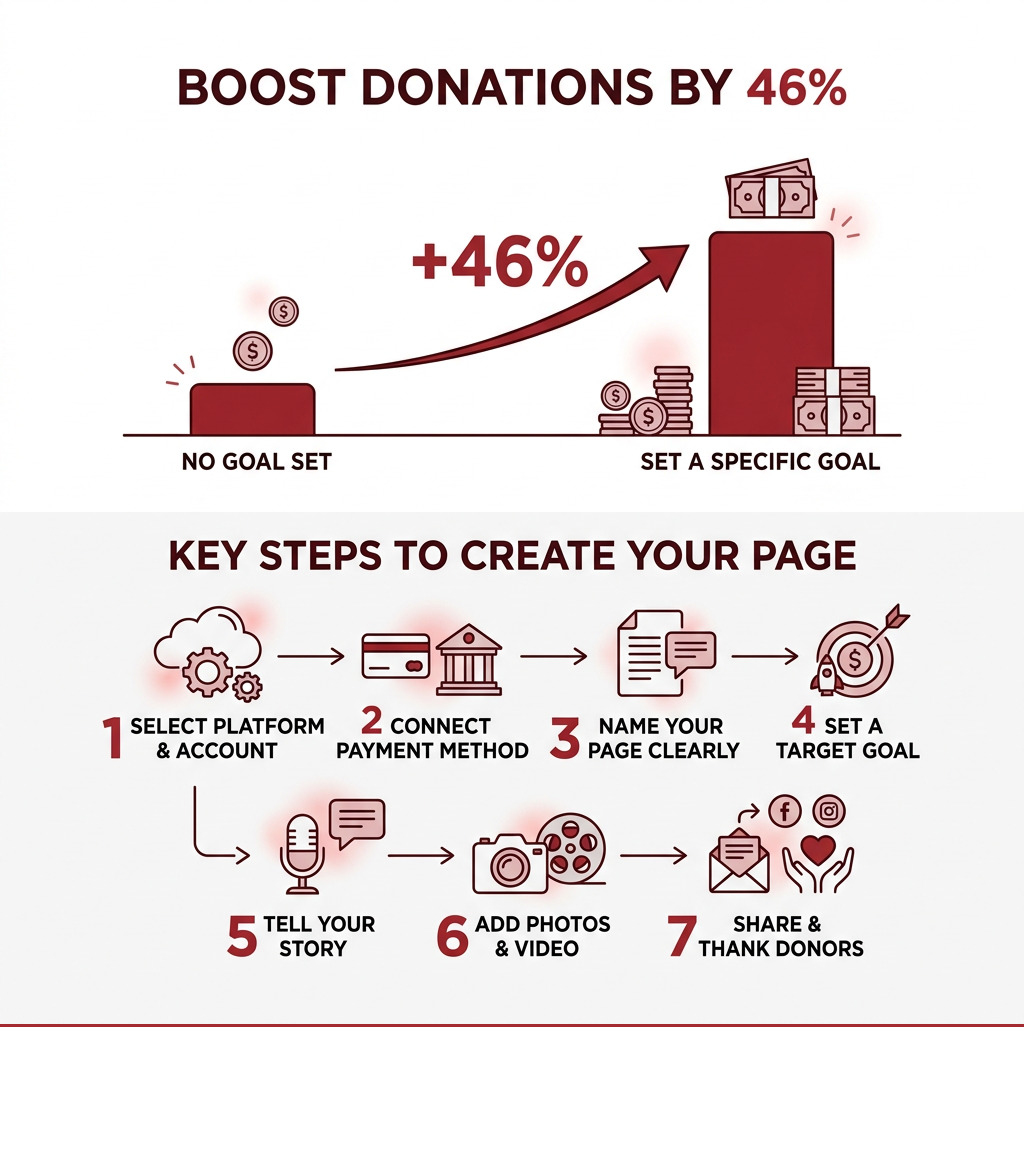
If you want to create a fundraising page that actually raises money, here’s how to do it fast:
- Choose a platform (GoFundMe, Givebutter, FreeFunder, or your own site)
- Set up your account and connect a payment method
- Name your page clearly and descriptively
- Set a specific goal — pages with a target raise 46% more donations
- Tell your story with photos and video
- Share widely via email, social media, and text
- Thank donors and post updates to keep momentum going
Raising money online has never been more accessible. Millions of dollars are raised every week on platforms like GoFundMe alone — with thousands of new fundraisers launched every single day. Whether you’re funding a medical emergency, supporting a nonprofit, or rallying your community around a cause, a well-built fundraising page is your single most powerful tool.
But here’s the problem most people run into: they create a page, share it once, and wonder why donations stall. The difference between a campaign that thrives and one that flatlines usually comes down to a few key decisions — your platform, your story, your goal, and how you share it.
This guide walks you through every step.
I’m Jeff Pratt, owner of JPG Designs — a digital agency with over 14 years of experience building high-converting websites and digital strategies for nonprofits, community organizations, and mission-driven businesses, including helping them create fundraising pages that drive real donor engagement. Whether you’re starting from scratch or improving an existing campaign, the strategies in this guide are built on what actually works.
Must-know create fundraising page terms:
How to Create a Fundraising Page That Converts
When you decide to create a fundraising page, you aren’t just putting a “Donate” button on the internet. You are building a digital headquarters for your mission. In our experience working with organizations in Rhode Island and Massachusetts, we’ve seen that the most successful pages act as a bridge between a problem and a solution.
Platform Selection: Where Should You Build?
Choosing the right platform is your first big hurdle. Different platforms serve different needs:
- GoFundMe: The “household name.” It is excellent for personal causes, medical bills, and emergency relief. They have a massive reach and a trusted “GoFundMe Guarantee.”
- Givebutter: A favorite for nonprofits. It offers three campaign types: simple forms, social crowdfunding pages, and full event ticketing.
- FreeFunder: A unique option for those on a tight budget. They charge 0% platform fees and even donate to your campaign based on how many Facebook shares you get.
- JustGiving: A global giant trusted by thousands of charities, perfect for “doing something incredible” like marathons or tributes.
- CauseVox: Great for peer-to-peer fundraising where you want your supporters to create their own mini-pages for your cause.
Understanding Fee Structures
Nothing kills momentum like realizing a huge chunk of your donations is disappearing into fees. Most platforms use a two-part fee system:
- Platform Fee: What the website charges to host your page (ranging from 0% to 5%).
- Processing Fee: What the credit card companies (like Stripe or PayPal) charge to move the money. This is almost universally 2.9% + $0.30 per transaction.
Some platforms, like Givebutter and FreeFunder, use a “tip” model where they ask donors for an optional contribution to keep the platform free for you. Unlock giving: easy ways to accept online donations by choosing a setup that maximizes the amount reaching your cause.
Tax Implications and Payouts
Before you hit “publish,” understand the tax side. For personal fundraisers (like medical bills), donations are often considered “nontaxable gifts,” but they aren’t tax-deductible for the donor. If you are a registered 501(c)(3) nonprofit, donors can usually deduct their contributions. Always consult a tax professional in your local area, whether you’re in Providence or Boston, to ensure you’re compliant.
| Platform | Platform Fee | Processing Fee | Best For |
|---|---|---|---|
| GoFundMe | 0% | 2.9% + $0.30 | Personal, Emergency |
| Givebutter | 0% (with tips) | 2.9% + $0.30 | Nonprofits, Events |
| FreeFunder | 0% | 2.9% + $0.30 | Personal, Small Teams |
| CauseVox | Varies | 2.9% + $0.30 | Peer-to-Peer |
Step-by-Step Guide to Create a Fundraising Page
Setting up your page shouldn’t feel like a chore. Most modern platforms have streamlined this into a few clicks. Here is the general flow to create a fundraising page:
- Account Setup: Sign up with your email. If you’re using a platform like CauseVox, you’ll select “Sign Up” and create a password to access your fundraiser dashboard.
- Choose Your Campaign Type: Decide if you need a simple donation form, a social page with a “supporter feed,” or an event registration.
- Name Your Page: Be descriptive! Instead of “Help Me,” try “Support Sarah’s Recovery Fund – Providence, RI.” Descriptive names help people find you via search.
- Set Your Goal: Be realistic but ambitious. Pages with a target raise 46% more.
- Configure Payouts: This is critical. You must connect your bank information or a Stripe account before you can receive funds. On Givebutter, for example, you can’t publish until your payout info is verified.
- Security Protocols: Ensure the platform uses SSL encryption. Donors need to feel safe entering their credit card details.
For more detailed technical walkthroughs, you can check out this How to create a Fundraising Page guide.
Personalizing Your Story for Maximum Impact
Why should someone give to you instead of the thousand other causes online? The answer is your story. A compelling narrative creates an emotional connection that transcends a simple transaction.
- The Hook: Start with the “Why.” Why are you doing this? Why now?
- The Impact: Tell donors exactly what their money does. Don’t just ask for $50; tell them $50 funds one day of research or provides ten meals.
- Visual Media: This is non-negotiable. Pages with photos and videos perform significantly better. Use high-quality images of the people or projects being helped.
- Authenticity: Be yourself. You don’t need to sound like a corporate brochure. A personal appeal, like those seen on CauseVox, often resonates more than a generic one.
When you create a fundraising page, you’re designing an experience. Our design for nonprofits complete guide emphasizes that visual storytelling is the fastest way to build donor trust.
Best Practices to Create a Fundraising Page for Mobile Users
At JPG Designs, we live by a “mobile-first” philosophy. Why? Because most people will see your fundraising link while scrolling on their phones. If your page is hard to read or the “Donate” button is too small for a thumb to click, you’re losing money.
- Fast Loading: If your page takes more than three seconds to load, donors will bounce. Optimize your images so they aren’t massive files.
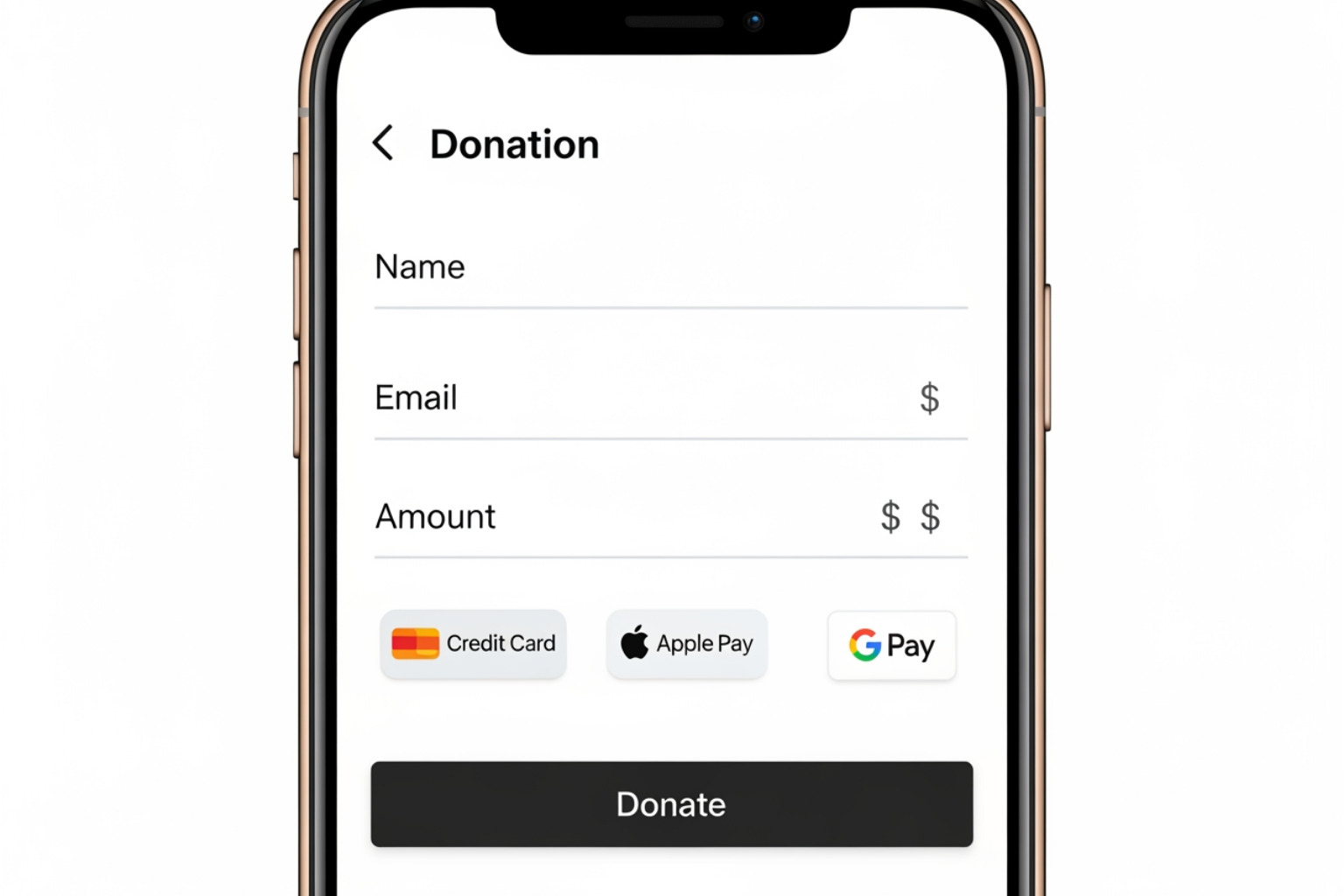
- Simple Forms: Don’t ask for the donor’s middle name, blood type, and high school mascot. Keep it to the essentials: Name, Email, and Payment Info.
- One-Click Payments: Support modern wallets like Apple Pay, Google Pay, and Venmo. Givebutter and GoFundMe are great at this.
- Accessibility: Ensure your text has high contrast and is readable for everyone.
The importance of a well-designed website for nonprofits cannot be overstated. A clunky mobile experience is the quickest way to signal to a donor that your organization might not be professional or secure.
Optimizing and Promoting Your Campaign for Success
Once you create a fundraising page, the real work begins. You can’t just “build it and they will come.” You have to go to them.
Setting Realistic Goals and Tracking Progress
Your goal is a lighthouse for your donors. If it’s too low, people might think you don’t really need help. If it’s too high, it might feel unattainable.
- The Progress Bar: This is a psychological trigger. People love helping a campaign reach its finish line.
- Milestone Celebrations: When you hit 25%, 50%, or 75% of your goal, post an update! It shows momentum and encourages those on the fence to jump in.
- Transparency: Be clear about where the money goes. If you’re managing a charity event, show the breakdown of costs vs. impact.
Effective Sharing Strategies Across Social Channels
To make your campaign go viral (or at least reach your aunt in Warwick), you need a multi-channel strategy.
- Email Marketing: This is still the king of conversions. Send a personal, heartfelt email to your closest contacts first. This “primes the pump” so the page doesn’t look empty when strangers arrive.
- Social Media: Don’t just post the link. Tell a micro-story. Share a video update. Tag people who have already donated to thank them publicly.
- Text-to-Donate: Platforms like FreeFunder offer custom keywords for offline fundraising. This is great for events in Rhode Island or Massachusetts where you can put a keyword on a flyer.
- Personal Invites: A direct message on WhatsApp or Messenger is 10x more effective than a generic Facebook post.
A solid non-profit digital strategy combines these channels to keep your cause top-of-mind without being annoying.
Common Mistakes to Avoid
When we help clients create a fundraising page, we often see these recurring errors:
- Setting it and forgetting it: You need to post updates at least once a week.
- Generic Titles: “Fundraiser for Non-Profit” is boring. “Help Us Build a New Playground in Smithfield” is a call to action.
- Poor Photo Quality: If your main image is blurry or dark, it looks untrustworthy.
- Forgetting the “Thank You”: Always, always thank your donors. A handwritten note or a personalized video (like the ones suggested by MSKCC) goes a long way toward donor retention.
Don’t forget to use SEO for nonprofits to ensure that when someone searches for your cause, your specific fundraising page is what they find.
Conclusion: Launching Your Mission with JPG Designs
Learning how to create a fundraising page is a vital skill in the modern world. Whether you’re helping a friend through a tough time or launching a major capital campaign for a regional nonprofit, the principles remain the same: choose the right platform, tell a story that tugs at the heartstrings, and make it incredibly easy for people to give from their phones.
At JPG Designs, we specialize in taking these concepts and turning them into high-performing digital realities. From mobile-first indexing to custom web design services for non-profit organizations, we help you cut through the noise and get your mission the attention it deserves.
Ready to make your mark? Whether you’re in Rhode Island, Massachusetts, or beyond, let’s build something that makes a difference.
Contact us today at JPG Designs to start building a fundraising presence that converts visitors into lifelong supporters.